Clans
Info
For details about clans click here.
Clan Turfs
- This page displays the in-game map with all clan zones.
- The color of the zones is given by the color of the clan that owns the respective zone.
- By placing the mouse over one of them you can see the name of the zone in the game as well as the name of the clan that owns it.
Top Clans
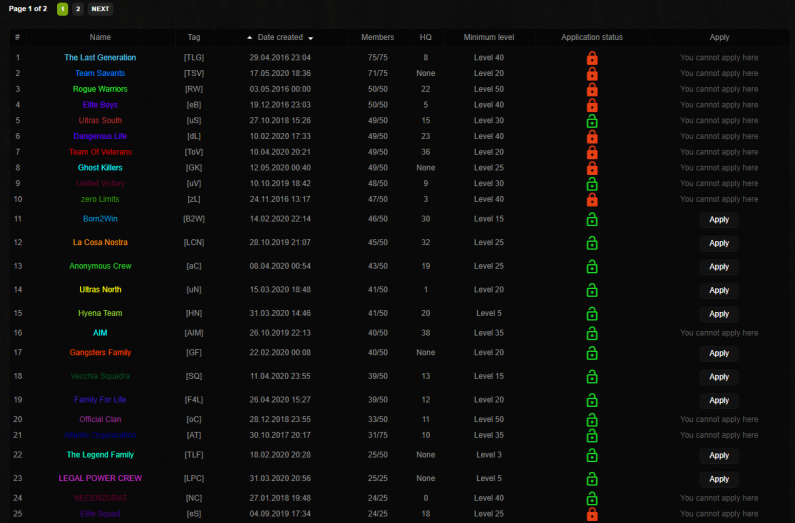
This page displays a table with all clans on the server which presents the following information about each clan:
- #: represents the row number.
- Name: represents the full name of the clan.
- Tag: represents the clan's tag.
- Clan Level: represents the current clan level.
- Date created: represents the date when the clan was founded.
- Members: represents the number of current members out of the maximum number of available members.
- HQ: represents the availability of the clan for an HQ.
- None means that this clan does not have an HQ. Any other number between 0 and 42 represents the in-game ID of the HQ.
- Minimum level: represents the minimum level you need to be able to apply to the clan.
- Application status: represents the status of applications for the clan, whether they are open or closed.
- Apply: represents whether or not you can apply to that clan.
Each clan owner has a certain control panel on the website, similar to that of faction leaders, from where they can invite, kick out members or give clan warnings and ranks.
How to apply?
To apply to a clan, from this page you must press the Apply button located next to the desired clan name. The website will redirect you to a form that you must complete, and after completion send the application to the clan owner for examination.
Warning: When completing an application, don't rush and don't exaggerate with unnecessary details. Use warm and decent language, explaining only the necessary information. A hastily completed and superficially thought application diminishes your chances of being accepted. You must keep in mind that the applications you complete remain permanently stored in the servers' databases and are visible on your profile.
How to find out if your application has been answered?
The website has a notification system, so each player is notified when the clan leader for which you sent an application responds to your application.
Haven't been accepted?
If your application hasn't been accepted, don't worry. Perseverance will lead to results, it's just a matter of time until you are accepted into a clan. When you are rejected, read the clan leader's response carefully and think about what your application was missing. After you understand the reason for rejection, gather your thoughts and complete a new application. This time, make sure to cover the mistakes from the last application.
Top Alliances
This page displays a table with all clans that form an alliance on the server, which presents the following information about each alliance:
- #: represents the row number.
- Name: represents the alliance name.
- Members: represents the total number of alliance members (the total number of members from all allied clans).
- Allied clans: represents the names of the allied clans.
Clan Levels
This page will display all available clan levels, divided into 3 categories:
- LEVEL: will display a representative image depending on the clan level.
- EXPERIENCE: will display the amount of XP required to unlock that level.
- FEATURES: will display all benefits of each clan level.