2FA Recovery
Players who have lost access to the device on which they had the 2FA application for their RPG account will be locked out of the account if they did not save the unique activation key when they did the activation.
How do I recover the unique 2FA key?
- The RPG website offers you the possibility to recover the unique 2FA activation key through the email address set on the account.
-
To do this you must follow these steps:
-
Access the website.
- Go to the Sign In section.
- Press the Recovery button and from the displayed list choose Recover 2FA.
- Enter the name of the account for which you want to recover the key together with the email address set on that account.
Note: If the email address entered is not exactly the same, you will not receive the key by email because you cannot prove that it is you.
How do I use the key received in the application?
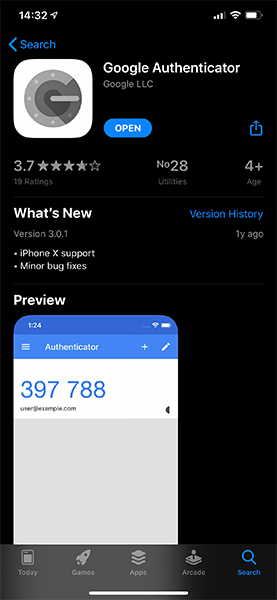
- Download one of the Two Factor Authentificator applications from Google Play or AppStore, you can use both Google Authentificator and Authy (the steps are the same).
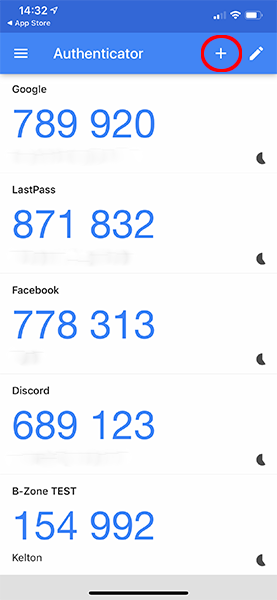
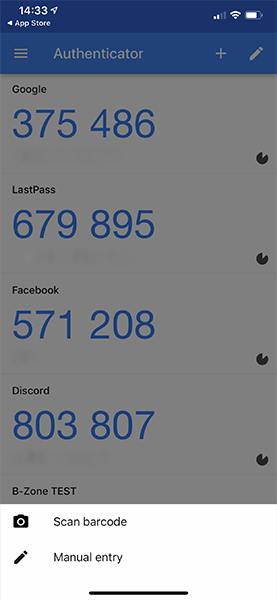
- Enter the downloaded application then click the + button and then choose Manual entry.
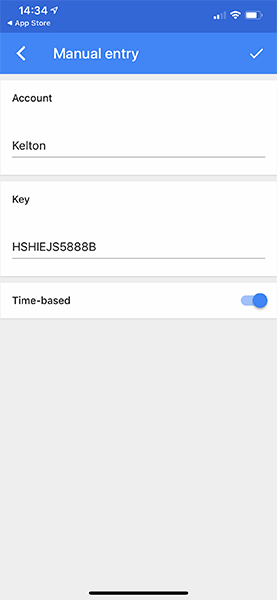
- In the Account box you can enter the account name to know which account it is from so you don't get confused if you have more than one.
- In the Key box enter the entire key exactly as you received it by email (try to be very careful with diacritics and letters that look similar).
- Then the application generates the unique 6-digit code that you can use again to access your account.