Vehicles
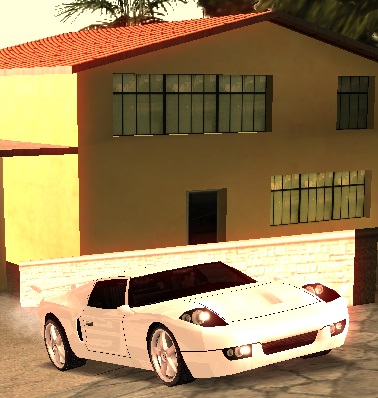
Everyone wants to have a beautiful, perfectly functional and fast personal car, but at the same time you must also know how you can control your own vehicles. Below you will find a list of all commands you can apply to a vehicle:
/vehicles
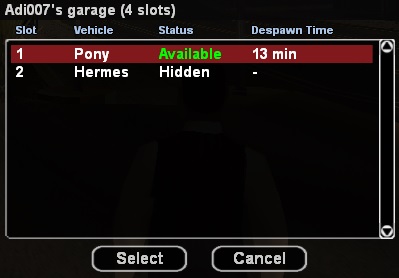
This command represents the control center of all personal vehicles of a player. The /vehicles command also has alternatives for accessing the control center such as commands: /v, /garage and /g. All these commands lead to a single place, the control center.
After using one of these commands, the server will display a list of all owned vehicles using the following model:
- ID of the slot occupied by the vehicle
- Vehicle name
- Its status (available, occupied, hidden)
- How long until the vehicle will be despawned.
Due to SA:MP server limitations, players with premium accounts can spawn up to 8 vehicles at the same time on the server, and those without premium accounts can spawn up to 2 vehicles at the same time on the server.
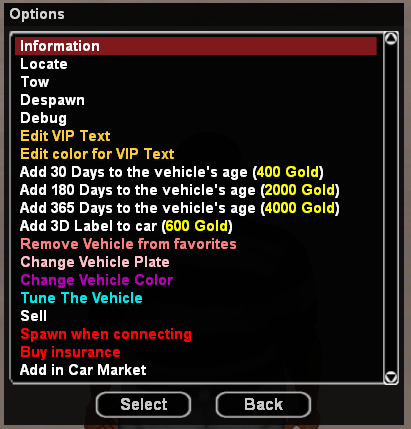
By selecting a vehicle from the list, the server provides you with several options with which you can control the vehicle.
Control options:
- Information - Information will be displayed such as: model, price, status (locked/unlocked), colors, kilometers, vehicle days, insurance, insurance cost, id, vip.
- Locate - A checkpoint will be set at the vehicle's position.
- Tow - Your vehicle will be respawned at the place where it was parked. The price of this service is $200.
- Spawn/Despawn - With this option you can make your vehicle appear/disappear temporarily from the server.
- Debug - This option can be useful when your vehicle has been parked improperly and can no longer be used (example: in a wall, in water). The vehicle will be parked in a safe location. Then use the location service to find your vehicle.
- Convert to VIP Vehicle - With this option you will be able to convert your vehicle to VIP. More details here.
- Edit VIP Text - With this option you can edit the VIP text on your vehicle.
- Note - This option will only be displayed if the vehicle is upgraded to VIP.
- Edit color for VIP Text - With this option you can edit the color of the VIP text on your vehicle.
- Note - This option will only be displayed if the vehicle is upgraded to VIP.
- Edit position for VIP Text - With this option you can edit the position (location) of the VIP text on your vehicle.
- Note - This option will only be displayed if the vehicle is upgraded to VIP.
- Add 30 Days to the vehicle's age - With this option you will be able to buy 30 days extra to the days of your selected vehicle for 400 Gold.
- Add 180 Days to the vehicle's age - With this option you will be able to buy 180 days extra to the days of your selected vehicle for 2000 Gold.
- Add 365 Days to the vehicle's age - With this option you will be able to buy 365 days extra to the days of your selected vehicle for 4000 Gold.
- Add 3D Label - With this option you will be able to buy 30 days extra to the days of your selected vehicle for 400 Gold. More details here
- Add Vehicle to favorites - With this option you will be able to add the selected vehicle to the list of favorite vehicles to make it easier to find and identify (useful for players with many vehicles in the garage).
- Remove Vehicle from favorites - With this option you will be able to remove the selected vehicle from the list of favorite vehicles.
- Change Vehicle Plate - With this option you will be able to change the number/license plate of the selected vehicle with another one of your choice.
- Note: choosing a vulgar/indecent text will lead to your sanction by the admins according to the RPG regulations.
- Change Vehicle Color - With this option if you have minimum skill 6 at the Car Mechanic job you will be able to change the permanent color of your vehicle without having to go to Car Color. You will be able to change both Hidden and Non Hidden colors, the prices will be identical as in Car Color. The money paid by players will be redirected to the biz.
- Tune The Vehicle - With this option if you have minimum skill 7 in the Car Mechanic job you will be able to tune your vehicle without having to go to a Tuning biz. The money paid by players will be redirected to the nearest Tuning business to them at the time of purchasing the components.
- Not all components will be available at skill 7, they will be unlocked gradually as you advance in skill.
- A discount is applied for vehicle components as follows:
- Skill 7: Front Bumper, Rear Bumper, Sideskirts, Hydraulics - 5% Discount.
- Skill 8: Roof, Front Bullbar, Hood, Lamps, Vents - 10% Discount.
- Skill 9: Spoiler, Wheels, Exhaust - 15% discount.
- Skill 10: NOS, Paintjob, Neons - 20% discount.
- Sell - Through this option you can sell the vehicle at DealerShip, only if you are around it.
- Spawn on login - Through this option you can select which vehicles will spawn automatically when connecting to the server.
- Buy insurance - Through this option you can buy insurance for the vehicle.
By default, a player has 4 vehicle slots, these can be supplemented from the Shop.
/engine
Using this command when you are in a vehicle has the effect of starting, or as the case may be, stopping the vehicle engine. As a shortcut to the command, you can also use key 2 on the keyboard.
/lock
The command is used by vehicle owners to lock or unlock their own vehicle. As a shortcut to the command, key N can be used. The command can only be used from near the vehicle.
/park
This command will fix the position in which the vehicle will be spawned when connecting to the server or when it explodes, sinks or when the towing service (tow) is used. The command can only be used if you are at the wheel of your vehicle.
/vehswitch
By typing this command, you will be able to change the vehicle you are currently driving with another vehicle that is not spawned.
/carcolor
A player can use this command only if they are in a personal vehicle and near the CarColor business. After typing the command, the player will be teleported with the vehicle inside a garage from where they can use the menu provided to select the desired colors. If a player is not near this business, a checkpoint will be set for them.
/buyinsurance
By typing the command, the vehicle owner will buy insurance for the vehicle they are in. A vehicle can have a maximum of 5 insurances. A vehicle left without insurance can no longer be driven by anyone until its owner pays the necessary repairs.
/buyvehicle
It only works if you are near one of the two dealership doors. Once the command is typed, the server will teleport you into a garage from where you can select the desired vehicle using the menu provided. The server also provides information such as the vehicle's price and speed, allows you to change its colors and most importantly, to do a test drive.
/givekey
To offer someone the keys to your own vehicle, use the /givekey command. The command uses a single parameter, the name or ID of the player to whom you want to lend the keys to your vehicle.
Example: /givekey 135
After offering the keys, the person who received them will be able to use the /lock command on the vehicle. This command can only be used near the vehicle.
/changelock
The command has the effect of changing the lock of the personal vehicle so that the players to whom you offered its keys can no longer unlock or lock the vehicle.
/throw
This command is used to throw certain objects in your possession, including the keys to a vehicle received from another player, either by renting a vehicle from specially arranged businesses (example: Bike rent). After using this command, you will no longer have a rented vehicle.
/swapcolors
The servers provide you with two sets of colors for your vehicles, the first set being primary, and the second secondary. By using the /swapcolors command, the vehicle colors will be reversed, which means that the primary will become secondary and the secondary will become primary.
/v -> Sell
To be able to sell a vehicle at Dealership you must be near it with the car you want to sell. From the /v menu you will select the desired vehicle and then choose the Sell option.
Note: To be able to sell the tutorial car at Dealership you need at least level 5.
/lights
Through this command you will be able to turn on the vehicle lights without activating the NOS system if it is installed.