Premium
This category of commands uses exclusively the server's real currency (gold), so please use them carefully to avoid unwanted situations.
/shop
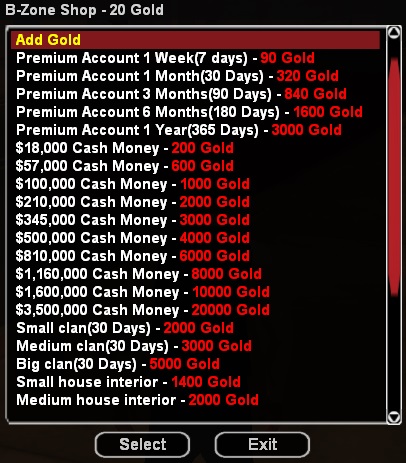
Any player can use this command to open the B-Zone community's virtual store (see the store in the image), on the RPG server. The store consists of a dialog with rows that present information following the model:
- Product name - Amount of gold required for purchase
The dialog title contains the amount of gold you have at that moment. If you have enough gold to buy a certain product from the store, the product's price will be colored green, otherwise red.
/hiddencolor
The command can only be used near the "CarColor" business and has the effect of teleporting the car into the color selection menu. There you can select special colors for your vehicle using gold, colors that cannot be accessed by simply typing the /carcolor command. The color selection menu is welcoming and extremely easy to use.