Bank
The B-Zone RPG server has 3 banks, one in each city (Las Venturas, Los Santos, San Fierro). The following commands can be used in any of the 3 banks (except command number 5, which can only be used near an ATM):
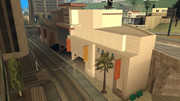
Los Santos Bank
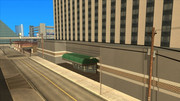
Las Venturas Bank
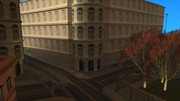
San Fierro Bank
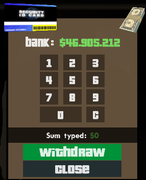
#1 ATM Interface
/balance
After using this command, the bank will display the amount of money you have in the bank at that moment. You can only use the command if you are in one of the 3 banks.
/withdraw
With this command you can withdraw money from your own bank account.
The syntax you must complete for the command to work successfully is: /withdraw
Example: /withdraw 5000 Effect: By using the example, you will receive $5,000 in hand, money that is withdrawn from your bank account.
/deposit
With this command you can add money to your own bank account.
The syntax you must complete for the command to work successfully is: /deposit
Example: /deposit 5000 Effect: It will withdraw $5,000 from the money you have on you and deposit it in the bank.
/transfer
With this command you can transfer money from your bank account to another player's bank account.
The syntax you must complete for the command to work successfully is: /transfer
Example: Assuming an online player, with the name "Adi007" and having ID 13: /transfer 13 5000 or /transfer Adi007 5000 Effect: It will withdraw $5,000 from the money you have in your bank account and deposit it in player Adi007's bank account.
Note: To transfer money, you need at least level 3. Note: The transfer fee is 1%, it can be calculated with the formula: 1/100 * transferred_amount
/atmwithdraw | /atm
By using the [/atmwithdraw] or [/atm] command in front of an ATM you can withdraw money from your bank account, in hand. Usually, when you reach an ATM, a welcoming interface will open (image #1), from where you will select the desired amount of money. However, if you accidentally close the interface, you can use one of the 2 commands mentioned above to reopen it. You can only use the command if you are near an ATM.
Note: If you want to find an ATM you can use the /gps command.