Private Frequency
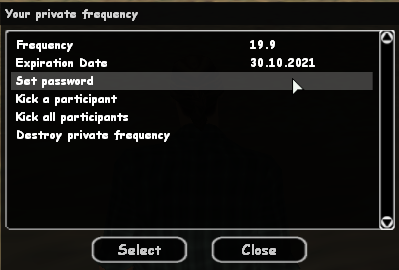

Keep in touch with friends much easier and support your friendships on the B-Zone RPG server through communication. Purchasing a private frequency gives you the ability to communicate with your friends in a safe place, where you have all the power, you decide who you want to stay on your frequency and who not, with options such as setting a password for the frequency, banning certain members from the frequency, or destroying the frequency if you get bored with it.
Duration and Price
- The price of a private frequency is 299 gold.
- Once purchased, a private frequency will be valid for 31 days.
- You can extend the lifetime of the private frequency by purchasing the option from /shop once more, adding another 31 days to the initial duration.
Remember
The price is standard, discounts from certain periods do not apply to this product.
Specific Commands
/myfreq
This command displays a dialog where you can find details about your frequency, expiration date, and some frequency options such as setting a password, excluding a member from the frequency, excluding all members, or destroying the frequency.
Note
Immediately after purchasing a frequency, you must choose your frequency ID.
/setfreq
Using this command you can set a frequency for your Walkie-Talkie.
Syntax: /setfreq
/wt
Represents the abbreviation of the object through which you speak, walkie talkie (radio station). This can be purchased from a 24/7 store. The command only works if you have set a frequency for the walkie talkie using the /setfreq command.
Example: "/wt message"
Note
The command only works if you have at least level 5.
How to Buy?
Follow these steps:
- Access the community shop using the /shop command.
- Select the Private frequency option from the displayed list.
- The server will display some information about the private frequency purchase process.
- After reading the information, press the Order button.
- Immediately after pressing the Order button, you will own a private frequency. To configure it, use the /myfreq command.
- Congratulations! You now have a frequency just for you and your friends.
Note
Learn how you can buy gold by following the steps on this page.