Hidden Color
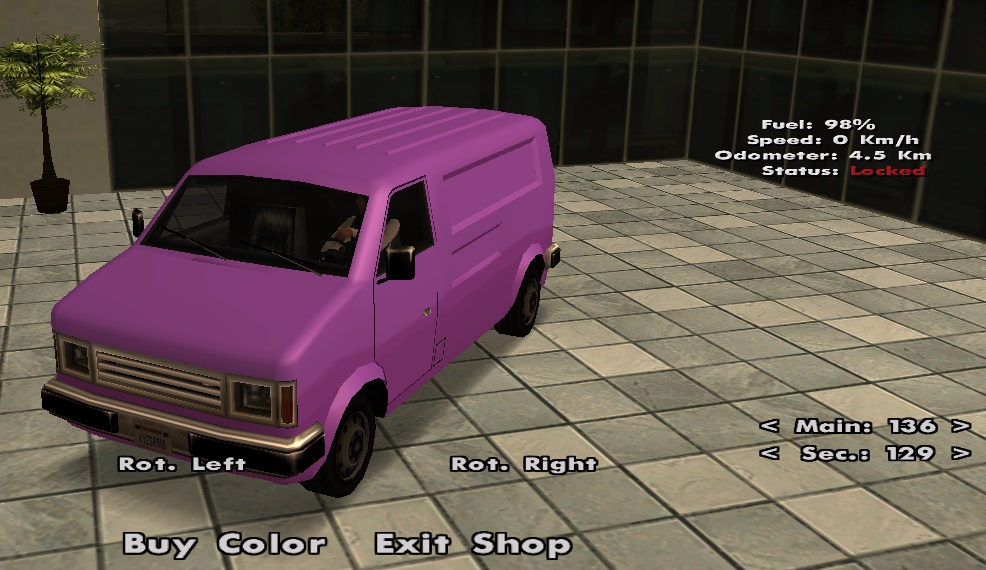
If you want a shiny vehicle with a special color, different from everyone else's, then you need to buy a set of hidden colors for your vehicle.
Note
Learn how you can buy gold by following the steps on this page.
Warning
The gold prices presented on this page are standard. It is possible that in-game products may be cheaper if you make the purchase during a discount period.
Price and Duration
- The price of a set of two colors (primary and secondary) costs 600 gold (see /shop).
- Once the two colors are purchased, they will remain usable for your vehicle forever, but if you want to sell the vehicle to another player, the color set will disappear.
How to Buy?
In just a few simple steps, your vehicle can have such a color set:
- Access the community shop using the /shop command.
- Select the following item from the displayed list: Hidden color - 600 Gold.
- The server will display some information about what you need to do to get the color set.
- After reading the information, press the Order button.
- If you have an active red checkpoint on the map, the server will abandon your order, requiring you to use the /cancel checkpoint command to cancel it. Once the checkpoint is canceled, follow the steps from the beginning.
- The server will set a red checkpoint on the map, you need to get there with the vehicle you want to install the color set on.
- If you canceled the red checkpoint provided by the Order button, don't worry. Type the /hiddencolor command and the checkpoint will appear again.
- To enter the hidden color selection menu, you must type the /hiddencolor command while being near the CarColor business.
- After finishing the selection of the two hidden colors, press the Buy Color button.
- Congratulations! You have a nicer vehicle.