Clan Color
General Information
Warning
The gold prices presented on this page are standard. It is possible that in-game products may be cheaper if you make the purchase during a discount period.
The Clan Color option from /shop allows changing the specific color of the clan.
The specific color is found in the TAG and clan name: at the player's name, on the HQ wall, on the wall of owned territories.
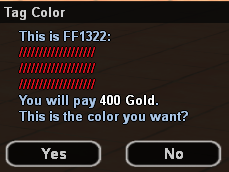
The standard price for changing the clan color is 400 Gold.
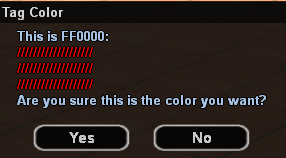
The first color change for clans is free and is done through the /clancolor command, where you will need to enter a HEX code for the desired color. You will also see a color preview and a confirmation message before the color changes.
You can find a bunch of websites by simply searching Google for "hex picker". If you don't want to manually search for such sites, you can go directly here: HTML Color Picker
- You will then need to choose the desired color by clicking on it.
- On the right side you will then see a preview of the selected color, as well as the HEX code. In our case, the HEX code is 3399FF for blue.
- Now that you have the HEX code, you can use the /clancolor 3399FF command in-game to change the color.
Warning
For the HEX code to work in-game, you must always write it in CAPITAL LETTERS.
How to Buy?
Follow these steps:
- Clan Color purchase is made directly from the /clancolor command.
- Use the above instructions to select the desired color and confirm the change by pressing the Yes button.
- Congratulations! You have now changed the clan color.