PIN
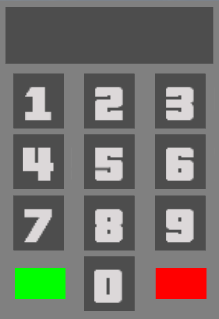
To maintain the security of the community players' accounts, the B-Zone team has created an ingenious system for protecting multiple functions, called PIN. As in everyday life, a PIN consists of four digits and represents the gateway to many facilities.
How does it work?
When a player tries to access areas protected by PIN, they will receive a specific message in chat such as: "to be able to use this command, type /Pin". To unlock functions protected by PIN, a player must type the command /unlockacc or /pin, after which the server will display a panel. The panel has numeric buttons with which you can form the PIN.
To validate the entered PIN, the green button is used, and to delete the entered numeric values, the red button is used. Once the PIN code is validated, the functions and commands protected by it are unlocked until leaving the server or typing the /lockacc command.
Protected functions
To protect the identity of players and to prevent those who want to do harm, the PIN currently protects a long list of functions including:
- All commands that bring changes to the financial situation (/buygun, /trade, /order, etc.).
- Selling/Buying vehicles from DealerShip.
- Access to the community shop (/shop).
- Certain important commands and functions of faction leaders.
Specific commands
/unlockacc or /pin
Using one of these commands, the server will display the panel in which you must enter the PIN code to completely unlock the account functions.
/addpin
Using this command, a player can set a security PIN code for the first time. Once the PIN code is set, the command can no longer be used.
/changepin
The command is used by players with the role of changing their PIN code.
Typing this command will display the same panel as in the case of the /unlockacc, /pin or /addpin commands. Once the panel is displayed, you must enter the current PIN code of the account. After entering the current PIN code, the server will ask you to enter the desired new PIN code.
PIN Recovery
To recover your account PIN, you must request a Recovery request by accessing the website rpg.b-zone.ro > My Account > Security > Recover PIN via Email.
After which the current account PIN is sent to the email address currently attached to the account. If you no longer have access to it, you cannot recover your account PIN and must open an account recovery request to have your email address changed by an administrator.