Garbage Man
General Characteristics
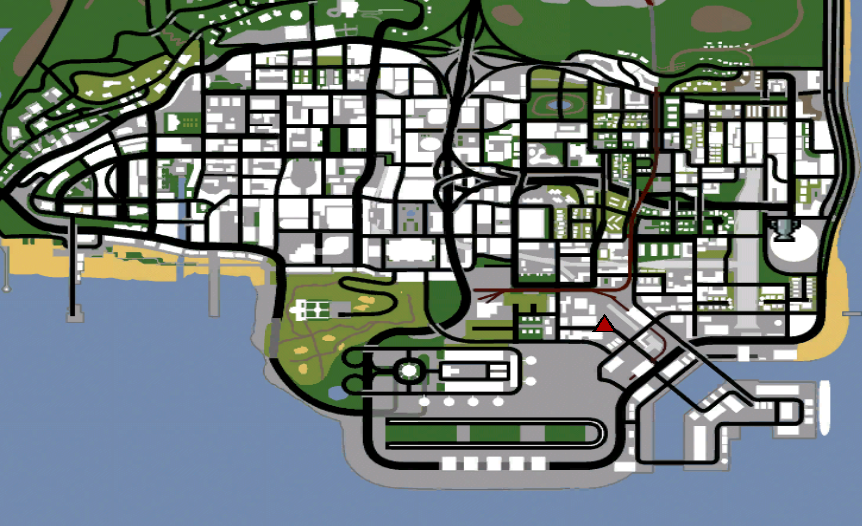
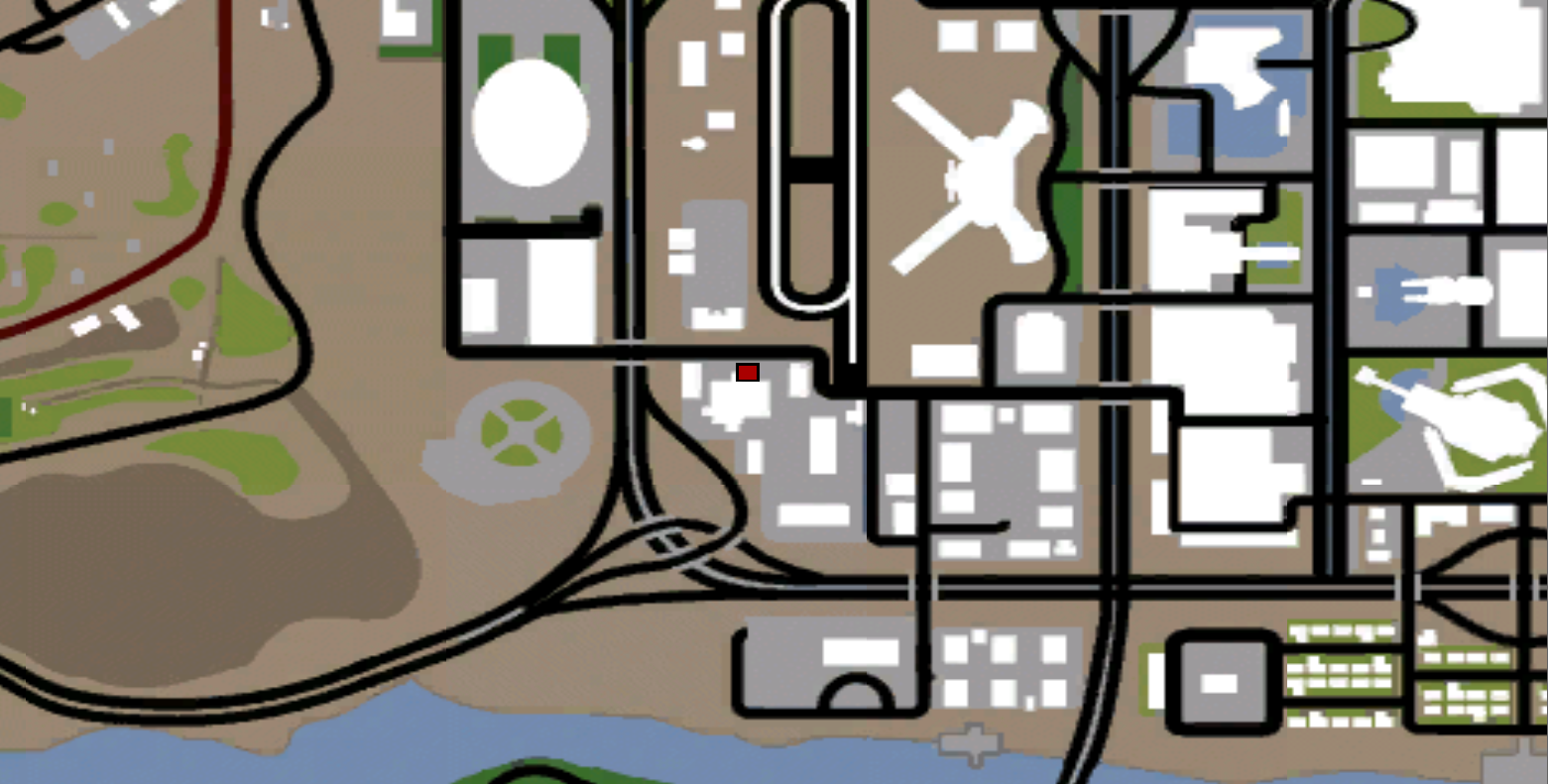
- The job is based in Los Santos and Las Venturas (see images #1 / #1').
- The job's vehicles are fuel-efficient and are locked for the duration of the job.
- The job contains five separate types of contracts.
- Every two skill levels a new branch of sanitation activity is introduced, starting with basic street cleaning and gradually progressing to residential waste collection, bulky waste recovery, commercial recycling and full municipal intervention operations.
- Each contract takes place in a randomly selected location and includes visible objects, map markers, mission instructions, task counters, vehicle-specific interactions and a payout calculated based on the player's skill and the amount of work completed.
Vehicle and Contract Progression
Skill 1-2: Sweeper - Street Cleaning
- New sweepers will start their career operating a Sweeper.
- After starting the contract, a dirty area on the street will be selected and marked on the map. You must drive the Sweeper to the assigned area, where several visible dirt patches will appear on the street.
- The cleaning process is done directly with the vehicle. You have to drive slowly over each marked dirt spot to remove it. The Sweeper cannot clean properly if it moves too fast, so the maximum speed allowed for cleaning is 35 km/h.
- When you approach a dirt spot at the correct speed, it will be removed, a cleaning effect will appear, and the number of remaining tasks will be updated. If you move over the speed limit, the area will not be cleaned and you will be instructed to slow down.
- The contract is completed after all dirt spots in the assigned area have been cleaned.
- Each completed contract awards 1 Skill Point / Clan XP / Marathon Point.
- Street cleaning is the introductory activity of the Garbage Collector job and is done individually. The co-op system becomes available starting with skill 3.
Skill 3-4: Walton - Residential Waste Collection
- At skill 3, players unlock residential waste collection contracts and receive a Walton adapted for neighborhood sanitation activities.
- A residential area will be assigned and marked on the map. Once you arrive there, several garbage bags will appear throughout the neighborhood.
- You must get off Walton, approach a garbage bag, and press the Y interaction key to pick it up. While carrying the bag, return to Walton and press Y near the vehicle to load it.
- The contract interface will permanently display the number of bags remaining and the number of bags already loaded. The contract is completed after all garbage bags in the residential area have been collected and loaded into Walton.
- Residential Waste Collection can be completed individually or with a co-op partner. Both players can collect and load the bags, allowing the team to complete the area much faster.
- Each completed collection awards 3 Skill Points / Clan XP / Marathon Points.
Skill 5-6: Yosemite - Bulky Waste Collection
- At skill 5, players move from regular household waste to heavy, oversized items.
- These contracts use a specially prepared Yosemite equipped with animated loading hooks. You will be sent to an area containing several bulky items that cannot be collected manually.
- To load an item, the Yosemite must first be positioned with its back to the bulky waste and completely stopped.
- A player on the ground must approach the waste and press Y to secure it. Once the item has been secured, the driver can press Y from inside the Yosemite to activate the loading mechanism.
- The hooks will lower to the object, grab it, lift it, and load it into the vehicle through a full animated sequence. The process must be repeated until all bulky objects have been recovered.
- When working individually, the player can secure the object from the ground, return to the driver's seat, and operate the hooks.
- When the contract is completed in co-op mode, it becomes a team-coordinated activity. One player can position and operate the Yosemite while the second player remains on the ground and secures the waste. This allows the team to continue loading objects without constantly changing positions.
- Each completed collection awards 3 Skill Points / Clan XP / Marathon Points.
Skill 7-8: DFT-30 - Commercial Recycling
- At skill 7, players unlock recycling contracts ccommercial and receive a DFT-30 divided into several sorting compartments.
- A commercial waste location will be assigned and marked on the map. Once you arrive, several waste type objects will appear around the area.
- Each object belongs to one of the following three categories:
- Recyclable waste
- Metal waste
- General waste
- You must get out of the DFT, approach an object, and press Y to pick it up. The system will identify the type of waste you are transporting.
- After collecting the object, return to the DFT and move to the correct sorting compartment. Press Y to insert the waste into the vehicle.
- If you use the wrong compartment, you will be informed of the correct category, and the object must be sorted properly before the route can continue.
- Both players can collect and sort waste during co-op activity. All progress is shared between the leader and the partner, and the contract is closed after each trade item has been placed in the correct compartment of the DFT.
- Each completed sort awards 4 Skill Points / Clan XP / Marathon Points.
Skill 9-10: Trashmaster - Municipal Intervention
- The highest skills of the Garbageman job unlock municipal intervention contracts, carried out with a Trashmaster equipped with several specialized sanitation tools.
- Instead of collecting a fixed type of waste, you will respond to sanitation reports reported in different areas of the city.
- The Trashmaster must first be driven to the reported location. Upon arrival, the actual sanitation problem will appear nearby and will be marked on the map.
- You must get out of the vehicle, approach the problem, and press Y to inspect it. The inspection will reveal the type of problem and the specific tool needed to solve it.
- Possible municipal issues include:
- Graffiti, which requires a pressure washer
- A damaged dumpster, which requires a repair kit
- A dirty area, which requires disinfectant
- A dumpster that is leaning out, which requires cleaning tools
- Blocked access, which requires warning cones
- After identifying the issue, return to the Trashmaster's tool area and press Y to open the equipment selection interface.
- Grab the correct tool, return to the sanitation issue, and press Y to begin the intervention. Each successful action increases the overall progress of the intervention until it reaches 100%.
- Using the wrong tool will not increase the progress of the complaint, so players should pay attention to the results of the inspection.
- After resolving a complaint, another municipal call will be automatically assigned until the entire route is completed.
- Players with skill 9 must resolve 3 municipal complaints for each contract.
- Players with skill 10 must resolve 2 municipal complaints for each contract, representing a faster and more specialized intervention at a higher level.
- Each completed intervention awards 4 Skill Points / Clan XP / Marathon Points.
- Municipal intervention offers full support for co-op mode. Both players can inspect problems, pick up tools, and contribute to the same common progress of the intervention.
Passive Scavenging Activity
- Reaching skill 7 in the Scavenger job also unlocks a new passive activity outside of the regular work contracts: scavenging through dumpsters located on the map.
- This activity allows experienced Scavengers to search through discarded waste to find money, illegal materials, drugs, crafting resources, tickets, artifacts, and more extremely rare rewards.
- Scavenging cannot be performed during an active work contract. Players must complete or stop their current route before they can begin searching dumpsters.
- To rummage through a dumpster, you must:
- Have at least skill 7 in the Scavenger job
- Be on foot
- Be outside, in the real world
- Not currently working on another job
- Not have an active checkpoint
- Not already be wanted
- Be near a dumpster that can be searched.
- Once near an available dumpster, use the /rummage command to begin searching.
- The player will be temporarily stuck in a rummage animation for 4 seconds. You must remain near the dumpster until the action is complete. If you move too far away, enter another interior, log out, or interrupt the action in any other way, the search will be canceled.
- Waiting times for searching:
- Each player has an individual waiting time of 45 seconds after completing a successful search.
- Each dumpster also has its own separate waiting time of 10 minutes. This means that even if your personal waiting time has expired, the same dumpster cannot be checkedt again until its availability timer has expired.
- A dumpster is temporarily reserved while a player checks it. Other players cannot start rummaging through the same dumpster until the first player's action is completed or canceled.
- Finding available dumpsters:
- Players with skill 7 or higher in the Scavenger job can use the /rummagebins command to open the full list of dumpster locations.
- The location system displays the closest dumpsters to your current location and includes the following information:
- The area where the dumpster is located
- The distance between you and the dumpster
- Whether the dumpster is currently available
- The remaining waiting time, if the dumpster was recently checked
- Whether another player is currently using it.
- The list is sorted by distance and contains up to 15 dumpsters per page. Selecting an available location allows you to mark and locate the selected dumpster.
- Risk of being spotted by the police and wanted:
- Digging is considered suspicious and illegal activity.
- When a player starts searching through a dumpster, the action is visibly announced to nearby players within a 15-meter radius. This means that digging in a populated or heavily patrolled area carries an additional risk.
- If a police officer discovers or catches you while you are digging, you may be wanted for this offense.
- Players who are already wanted cannot start another digging action. Therefore, choosing isolated dumpsters and paying attention to nearby officers is an important part of the mechanics.
- Digging reward list:
- Each completed digging action first checks the list of extremely rare rewards. If an ultra-rare reward is not selected, the system continues with the normal reward list.
- The standard reward list contains the following chances:
- 25% chance of finding nothing useful
- 67% chance of finding a small amount of money
- 5% chance of finding materials
- 2% chance of finding drugs
- 1% chance of finding crafting materials
- The quantity and quality of certain rewards improve depending on your skill at the Scavenger job.
- Ultra-rare reward list:
- Each completed scavenging action also has a 1 in 100,000 chance of activating the ultra-rare reward list.
- When this happens, the possible rewards are:
- 40% chance of receiving an unused Dealership Stock Coupon
- 30% chance of receiving a Diamond Ticket
- 20% chance of receiving an Onyx Ticket
- 10% chance of recovering an artifact.
- The type of artifact found is influenced by the player's skill in the Scavenger job, with higher skills offering better artifact probabilities.
- Artifacts are added directly to the player's artifact inventory. If the player has no available artifact slots, the system instead offers a Dealership Stock Coupon, ensuring that an ultra-rare reward is not lost entirely.
Scavenger Job Co-op System
- Starting at skill 3, players can choose between working individually or inviting another player as a co-op partner.
- When using the /work command, eligible players will be given the following options:
- Work individually
- Invite a co-op partner.
- To be invited, the partner must:
- Have at least skill 3 in the Scavenger job
- Have Scavenger selected as the current job
- Not already working
- Be present at the starting location of the Scavenger job
- Not be in a vehicle
- After accepting the invitation, both players will participate in the same route and use the same sanitation vehicle.
- The leader controls the contract and receives the vehicle corresponding to his/her Scavenger job skill. The partner joins as a passenger and receives the same checkpoints, mission instructions, items, and route progress.
- Co-op participation is available in the following contracts:
- Residential Waste Collection: Both players can collect and load garbage bags
- Bulky Waste Collection: One player can secure the waste, while the driver operates the hooks
- Commercial Recycling: Both players can collect and sort waste
- Municipal Intervention: Both players can inspect the complaints and increase the joint repair progress.
- A co-op partner can leave the route without forcing the leader to stop the activity. In this case, the leader can continue and complete the remaining contract alone.
- Co-op Contribution and Rewards:
- The co-op reward system was designed to prevent inactive players from receiving money without helping.
- A partner becomes eligible for a reward after completing at least one relevant action during the contract.
- The required contribution depends on the active contract:
- Residential Waste Collection: the partner must load at least one garbage bag
- Bulky Waste Collection: the partner must fix at least one bulky object
- Commercial Recycling: the partner must correctly sort at least one object
- Municipal Intervention: the partner must perform at least one intervention action on a complaint.
- When the partner contributes, the base income of the contract is split equally, 50/50, between the leader and the partner.
- When the partner does not contribute, he does not receive money or rewards for the contract, and the leader receives 100% of the base income.
- Single item loading and multi-item loading now have the same contribution requirement. After the partner has performed at least one valid action, the 50/50 split is activated for that contract.
- Existing job bonuses are then calculated separately for each player. This means that leader bonuses are applied to the leader's share, and partner bonuses are applied separately to the partner's share.
- Since each player can have different active bonuses, the final payouts may be different even if the base shares are equal.
- Co-op partners who contribute also receive:
- 1 Scavenger skill point
- 1 Marathon point
- 1 Clan XP.
- The leader continues to receive the normal contract rewards, calculated based on skill.
Payout
- Each Scavenger job contract now has its own base salary, set based on activity, vehicle, effort required, and player skill.
- The following amounts represent base salaries for full contract completion, before additional job bonuses are applied:
- Skill 1 - Street Cleaning: $500
- Skill 2 - Street Cleaning: $550
- Skill 3 - Residential Waste Collection: $680
- Skill 4 - Residential Waste Collection: $970
- Skill 5 - Bulky Waste Collection: $1,250
- Skill 6 - Bulky Waste Collection: $1,550
- Skill 7 - Commercial Recycling: $2,100
- Skill 8 - Commercial Recycling: $2,700
- Skill 9 - Municipal Intervention: $3,300
- Skill 10 - Municipal Intervention: $3,900.
- For residential waste collection, bulky waste collection and commercial recycling, the base payment is calculated based on the number of active objects included in the contract. Completing a full route provides the full amount mentioned above.
Progression in Skill
- To advance from skill level 1 to 2, you must complete 30 runs. (total: 30)
- To advance from skill level 2 to 3, you must complete 90 runs. (total: 120)
- To advance from skill level 3 to 4, you must complete 210 runs. (total: 350)
- To advance from skill level 4 to 5, you must complete 450 runs. (total: 800)
- To advance from skill level 5 to 6, you must complete 650 runs. (total: 1,450)
- To advance from skill level 6 to 7, you must complete 900 runs. (total: 2,350)
- To advance from skill level 7 to 8, you must complete 1,200 runs. (total: 3,550)
- To advance from skill level 8 to 9, you must complete 1,550 runs. (total: 5,100)
- To advance from skill level 4 to 5, you must complete 1,900 runs. (total: 7,000)
Vehicles by Skill
Sweeper
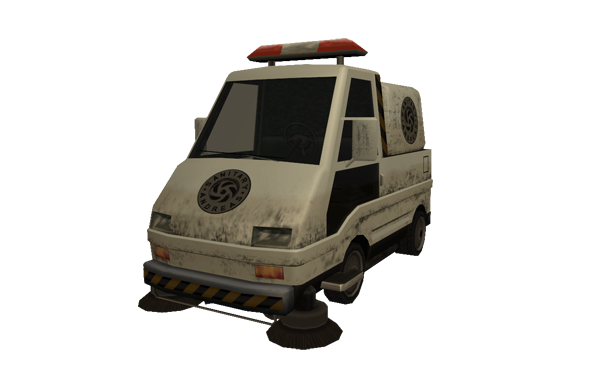
- Dealership Price: $765,000
- Dealership Return: $459,000
- Top Speed: 60 KM/h
- Origin: Unknown
- Number of Seats: 1
- Tunable: Transfender
Walton
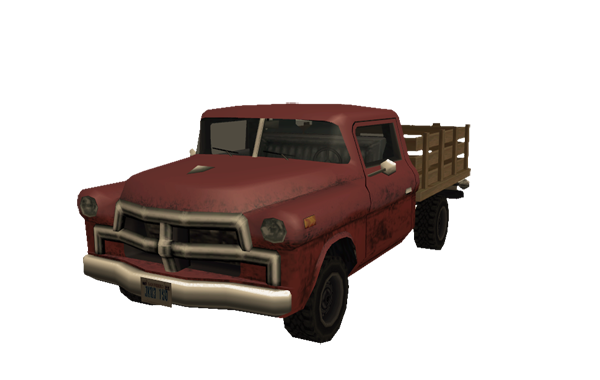
- Dealership Price: $6,600
- Dealership Return: $3,960
- Top Speed: 118 KM/h
- Origin: 1956 Chevrolet Task Force
- Number of Seats: 2
- Tunable: Transfender
Yosemite
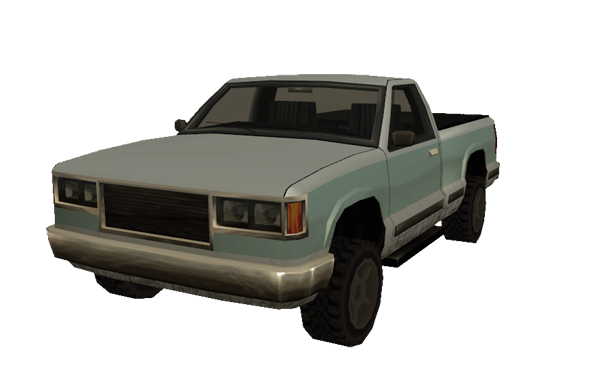
- Dealership Price: $172,500
- Dealership Return: $103,500
- Top Speed: 144 KM/h
- From: Chevrolet Silverado 1998
- Number of Seats: 4
- Tunable: Transfender
DFT-30
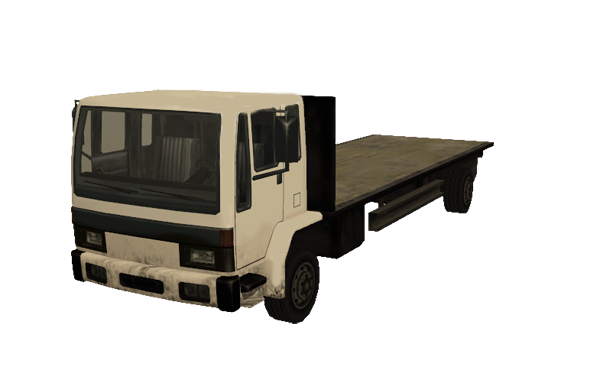
- In-Game Price: $30,000,000
- Dealership Return: $0
- Gold Price: 6,000 Gold
- Top Speed: 130 KM/h
- From: Ford Cargo
- Number of Seats: 2
- Tunable: Transfender
Trashmaster
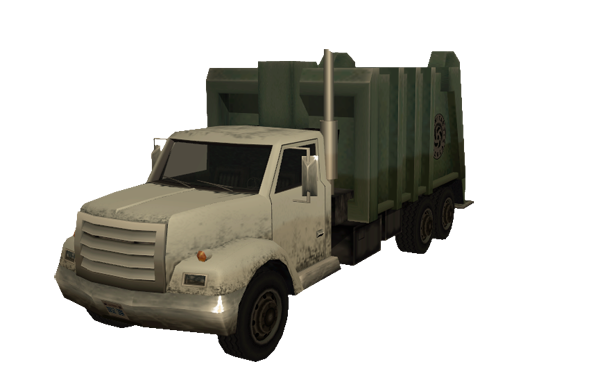
- Top speed: 100 KM/h
- Derived from: Ford F700
- Number of seats: 2
- Required skill: Any skill
- Tunable: TransFender
Specific Commands
/work
Using this command the server will give you the Trashmaster vehicle to start work. If you are not close enough to the location set as the starting point of the missions, the server will guide you to this area by fixing a red dot on your radar.